
Exploring Unit testing - C# .NET Essentials
What? 🤔
Imagine building a toy car. You spend hours crafting it, making sure all the wheels turn smoothly, the body holds together, and it looks perfect. But what if you forget to check if it moves when you push it? That’s a bit like writing computer code without testing it. Testing code is like making sure the toy car actually rolls when you give it a nudge. If we don’t check, it might have a broken wheel or get stuck, and we won’t know until we try to play with it.
In the world of computer programming, not testing your code is a bit like playing hide and seek blindfolded. We write small tests to make sure every little piece of our code works just like we expect it to. These tests are called “unit tests.” Unit tests check if the small bits of code (like tiny Lego blocks) do what they’re supposed to do. They help us catch mistakes early, making sure our code works well together and doesn’t break when we make changes. They are our safety net, ensuring our code doesn’t stumble and fall when it’s put to work.
In this article, we’ll explore the importance of unit testing, especially in C# .NET. We’ll see why it’s essential, how it helps prevent problems, and the tools we use to make sure our code is solid.
Why? 🤔
1. Early Detection of Bugs:
Unit tests allow developers to catch bugs and errors early in the development process. By testing individual units of code in isolation, issues can be identified and fixed before they have a chance to propagate through the entire system.
2. Code Quality Assurance:
Unit tests act as a safety net, ensuring that each unit of code adheres to the specified requirements and design. This leads to higher code quality and reduces the likelihood of introducing defects during code changes or feature additions.
3. Facilitates Refactoring:
Unit testing empowers developers to refactor code with confidence. When you make changes to the codebase, you can run the corresponding unit tests to verify that existing functionality remains intact. This promotes code maintainability and allows for continuous improvement.
4. Documentation and Specifications:
Unit tests act as ongoing documentation for the codebase. They provide a clear and executable specification of how each unit of code should behave. This documentation is invaluable for both current and future developers working on the project.
5. Regression Testing:
Unit tests act as a form of regression testing, ensuring that new code changes do not unintentionally break existing functionality. This is especially crucial in large and complex projects where the impact of changes can be challenging to predict.
6. Enhances Collaboration:
Unit testing encourages collaboration among team members. When developers write unit tests, they communicate their understanding of the code’s requirements and expected behavior. This makes it easier for team members to work together and share responsibilities.
Testing Frameworks
.NET supports various testing frameworks such as MSTest, NUnit, and xUnit. These frameworks offer a set of tools and conventions for writing and executing tests. Developers can choose the framework that best suits their needs and preferences. For this article I will start with XUnit.
How? 🤔
To write unit tests one must have the basic knowledge of C# and some tools like visual studio or dotnet CLI with visual studio code. For this article I will be using dotnet CLI and visual studio code.
So how should one start, that is very simple lets start with a console app to make this simple and easy.
Create a project
Lets start will creating a solution file that will contain our project and the class library for testing.
Note: If you are using visual studio then you can simply create a new console app and give it the name Calculator and it will create solution file and the console project for you.
dotnet new sln -o CalculatorThe above command will create a solution file named Calculator.sln inside a folder Calculator. The -o parameter in the command means put the output inside the folder then comes the name of folder as here it is Calculator. There are other options like -n that specifies the name of the solution file or the project. You can see all option by running help command dotnet new --help
cd Calculator   # this will enter into the Calculator folder as inside the command line.

dotnet new console -o Calculator
Then above command will create a project named Calculator. The folder structure will look like below:
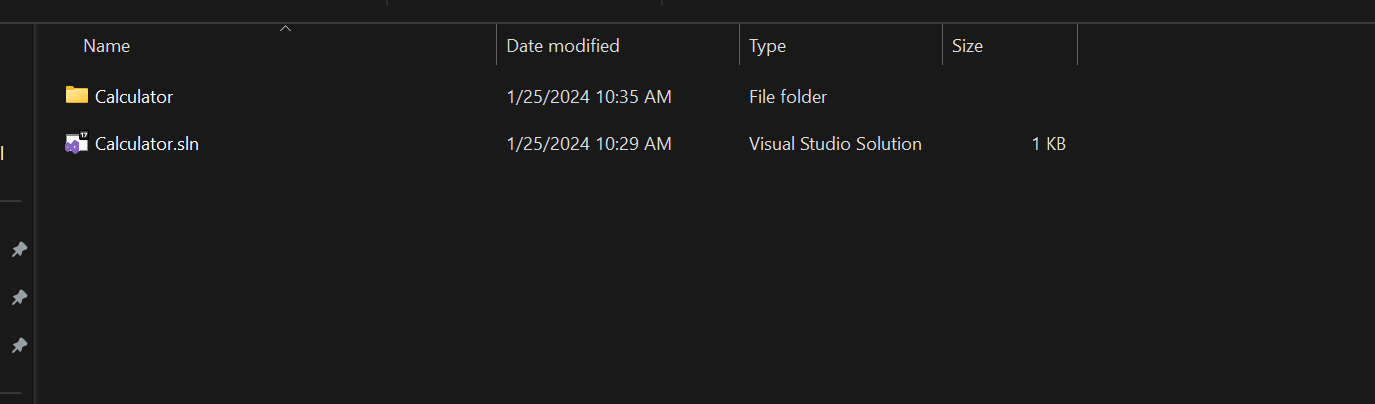
Lets add the newly created project to the .sln file by running the below command:
dotnet sln Calculator.sln add .CalculatorCalculator.csprojThis command will add the Calculator.csproj project reference into the sln file. By running dotnet build you can see the build results.
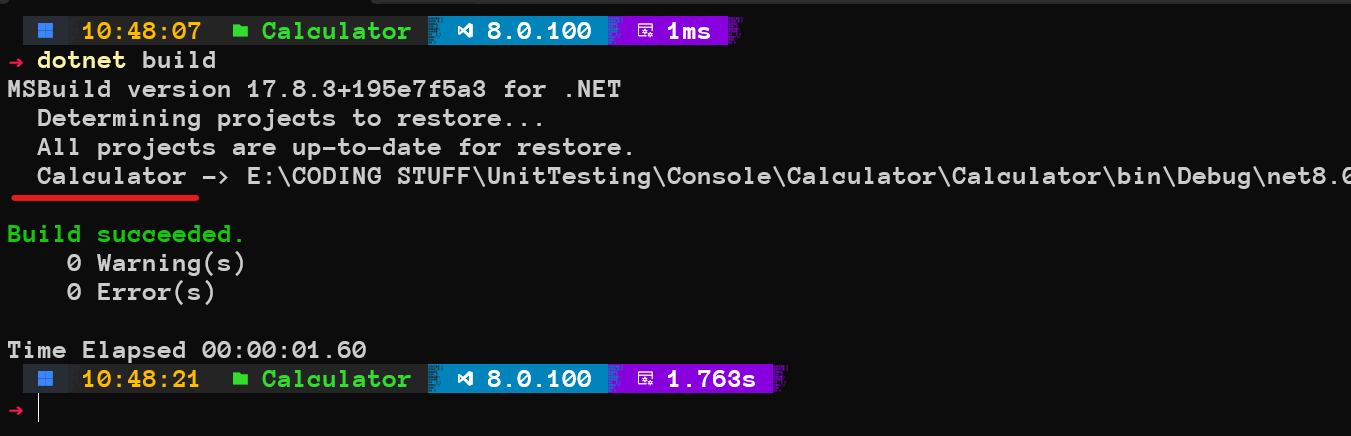
As we can see in the above screenshot it has found the project Calculator is being found the built.
If you don’t add the project to the .sln file and run the same command dotnet build then you will see the below warning: 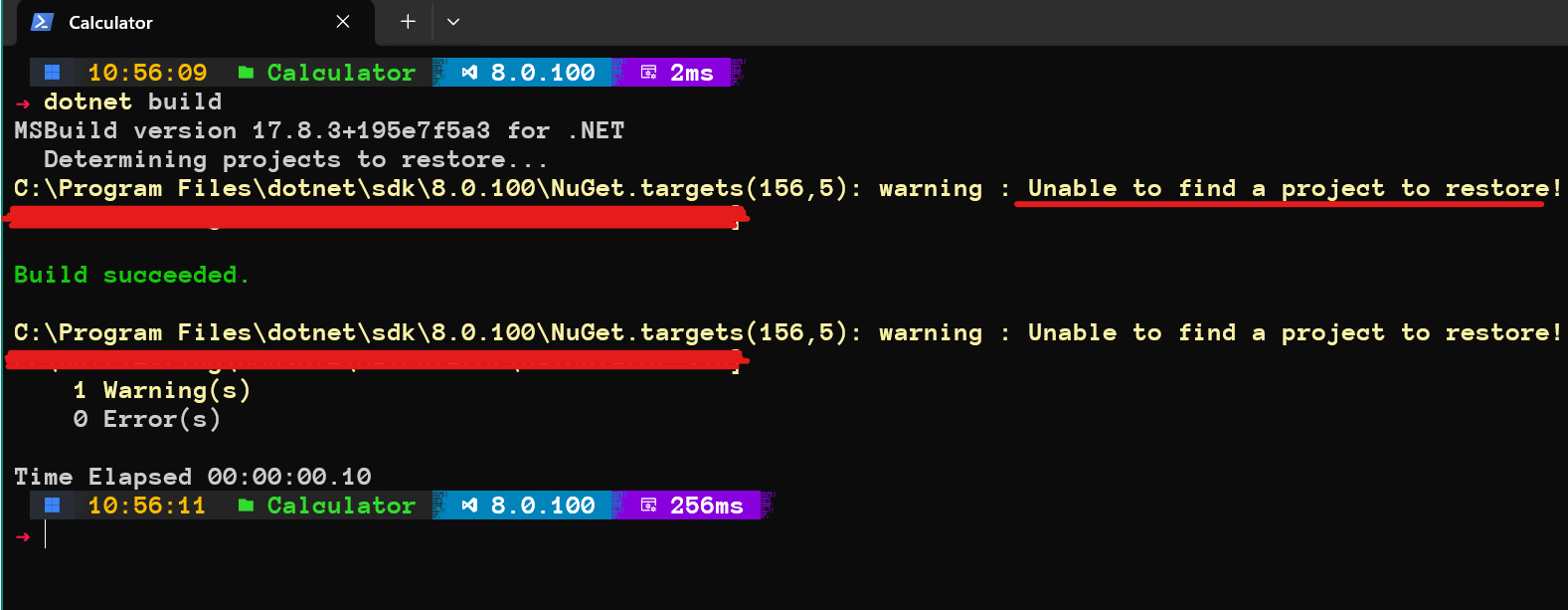
This means the dotnet build command is unable to find any project inside .sln file.
Lets move on.
Next we add the XUnit project and add that into the sln as well. For visual studio just right click on the solution file > Add Project > and search for XUnit project and add it.
For CLI run the below commands.
dotnet new xunit -o CalculatorTestsNow you will see another project in the folder as CalculatorTests. To add that into the sln file we will run the same command as above.
dotnet sln .Calculator.sln add .CalculatorTestsCalculatorTests.csprojNow if you run dotnet build command again you will see the below result as it finds both of our projects Calculator and CalculatorTests. Now lets open the whole file in the vscode by running code . command or you can just open up visual studio code and open folder directly from file menu.
The folder structure should look like this: 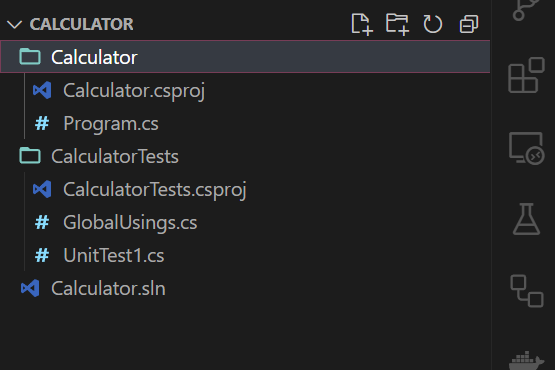
Our first test 😨
Now lets open the UnitTest1 file and see what is inside.
This is the default code inside the UnitTest1.cs. We can actually remove this file or rename it upto your choice. I will rename the existing file.
namespace CalculatorTests;

public class UnitTest1
{
    [Fact]
    public void Test1()
    {

    }
}
Now, We will follow the TDD - Test Driven Development approach which means we write the test first, the test fails and then we write the code to satisfy those tests. So, create a file inside the unit tests project CalculatorTests.cs. We will require a Calculator class as well in the console project so lets create one. The project structure should now look like:
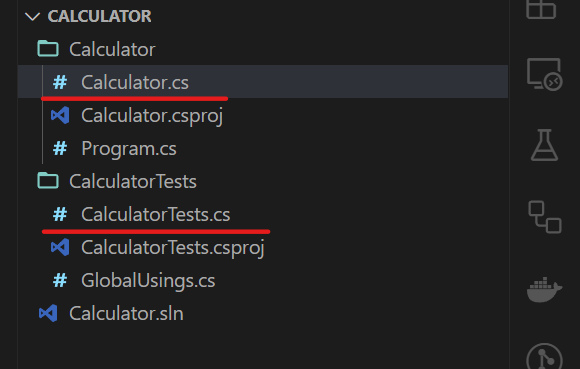
As, you can see the name of the file is Calculator.cs and the test file name is CalculatorTests.cs. this naming convention makes it easier to locate tests of a particular class or file. Now as I said we will follow TDD approach lets write our first test.
Lets write a test for an addition function.
  [Fact]
  public void Addition_OnSuccess_ReturnsCorrectResult()
  {
      // Arrange

      // Act

      // Assert
  }
The test is written following the 3 A approach which are.
Arrange: Initialization or arrangement of the required components.
- Here usually we initilize the object of the class that is being tested, the variables that can be send as parameters and the expected result.
Act: Usually this is where we call the functions that is under test.
- Here we will call the function that will be tested.
Assert: Test the result.
- And finally we will compare the result will the expected value.
The [Fact] attribute tells the test runner to treat it as test case.
[Fact]
public void Addition_OnSuccess_ReturnsCorrectResult()
{
    // Arrange
    Calculator _sut = new Calculator();
    int num1 = 10;
    int num2 = 20;
    int expected = 30;

    // Act
    int result = _sut.Addition(num1, num2);

    // Assert
    Assert.Equal(expected, result);
}
That is how we write a test. Now if we run it we will definitely see error because that is what TDD approach is we wrote the test but the system that we want to test is still not created yet. Lets still test the code.
dotnet test # this command will find all the tests and run themWe will get the below error:
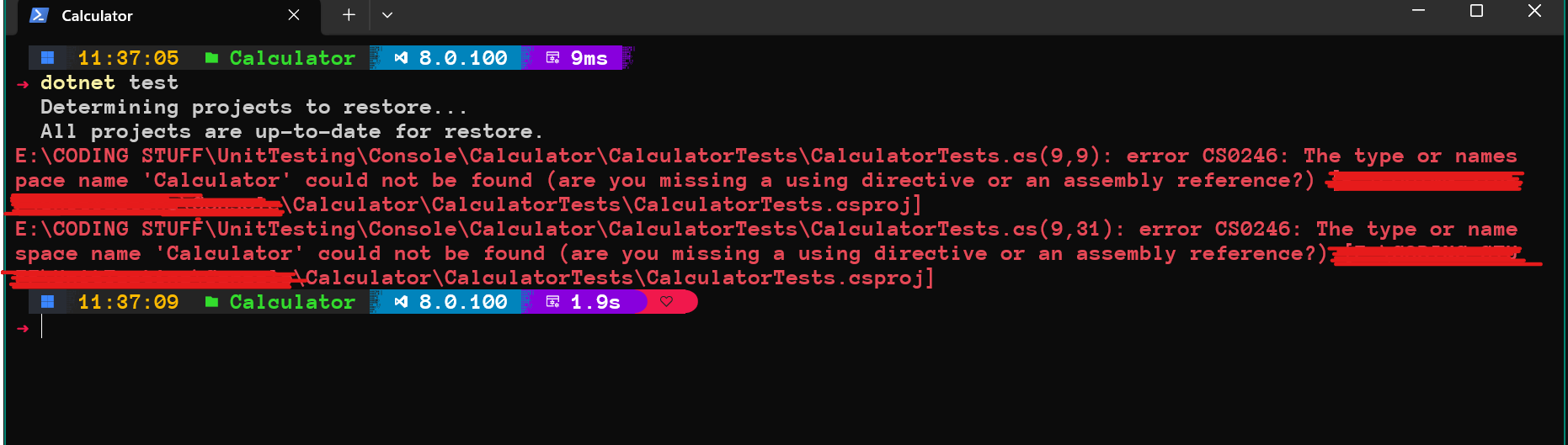
Even if we create a Calculator.cs file and the Calculator class inside the Calculator project it will still not run because we need to add reference of the Calculator project into the CalculatorTest project. For that run the below command.
dotnet add .CalculatorTestsCalculatorTests.csproj reference .CalculatorCalculator.csprojWe also created a file in the console earlier Calculator.cs. Which will look like below after adding the Addition function:
namespace Calculator;

public class Calculator
{

  public int Addition(int num1, int num2)
  {
    return 0;
  }

}
As for now the Addition function does not do anything. So if we run the tests the test case will fail. There will be no error but the test call cannot pass as we have not implemented Addition function correctly.
dotnet test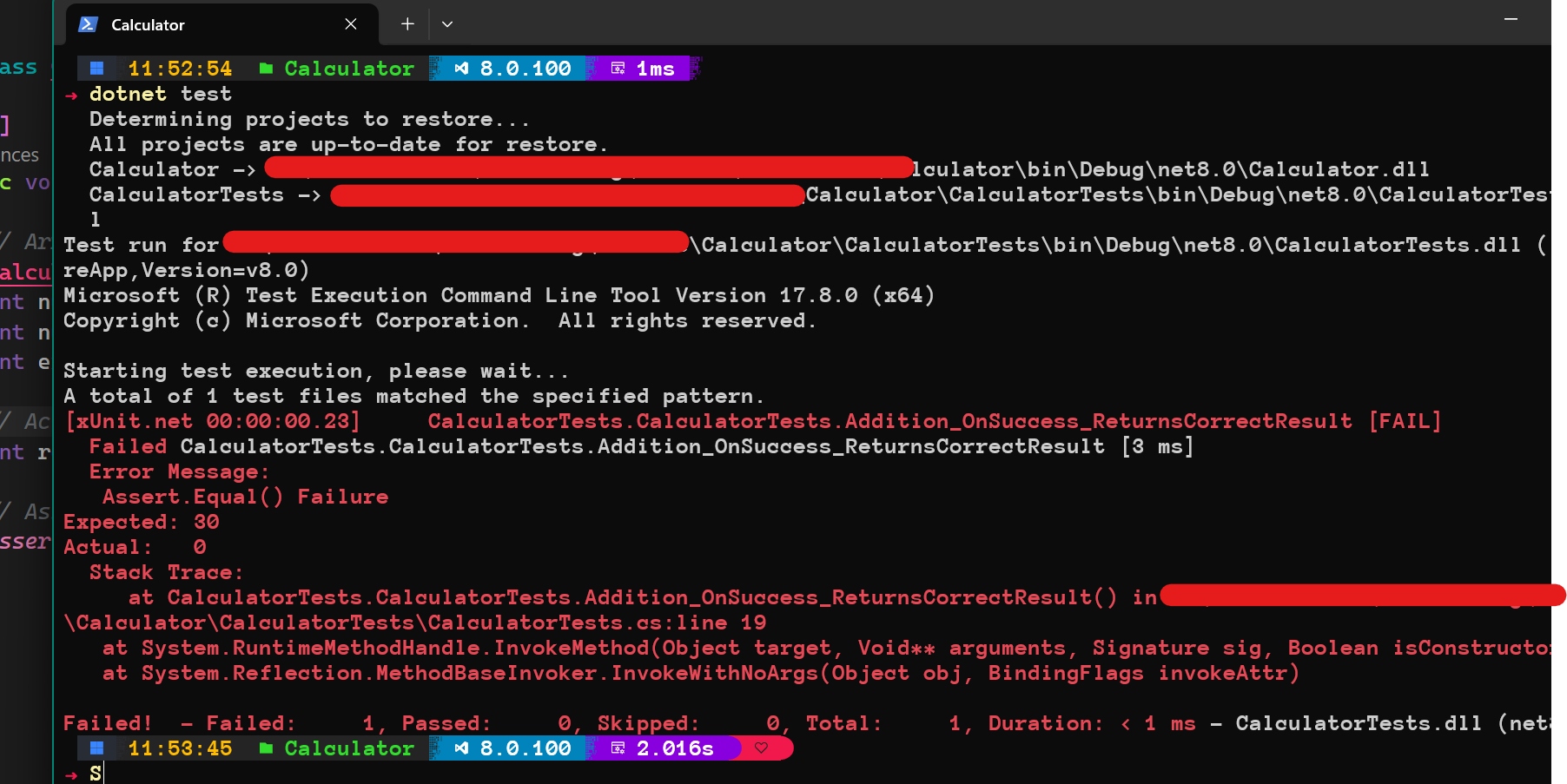
As we can see our test case has failed giving the message that Addition_OnSuccess_ReturnsCorrectResult [FAIL] then says: Expected: 30, Actual: 0.
Now, lets implement the Addition function.
  public int Addition(int num1, int num2)
  {
    return num1 + num2;
  }
If you run again after writing above code the we will see the result as:
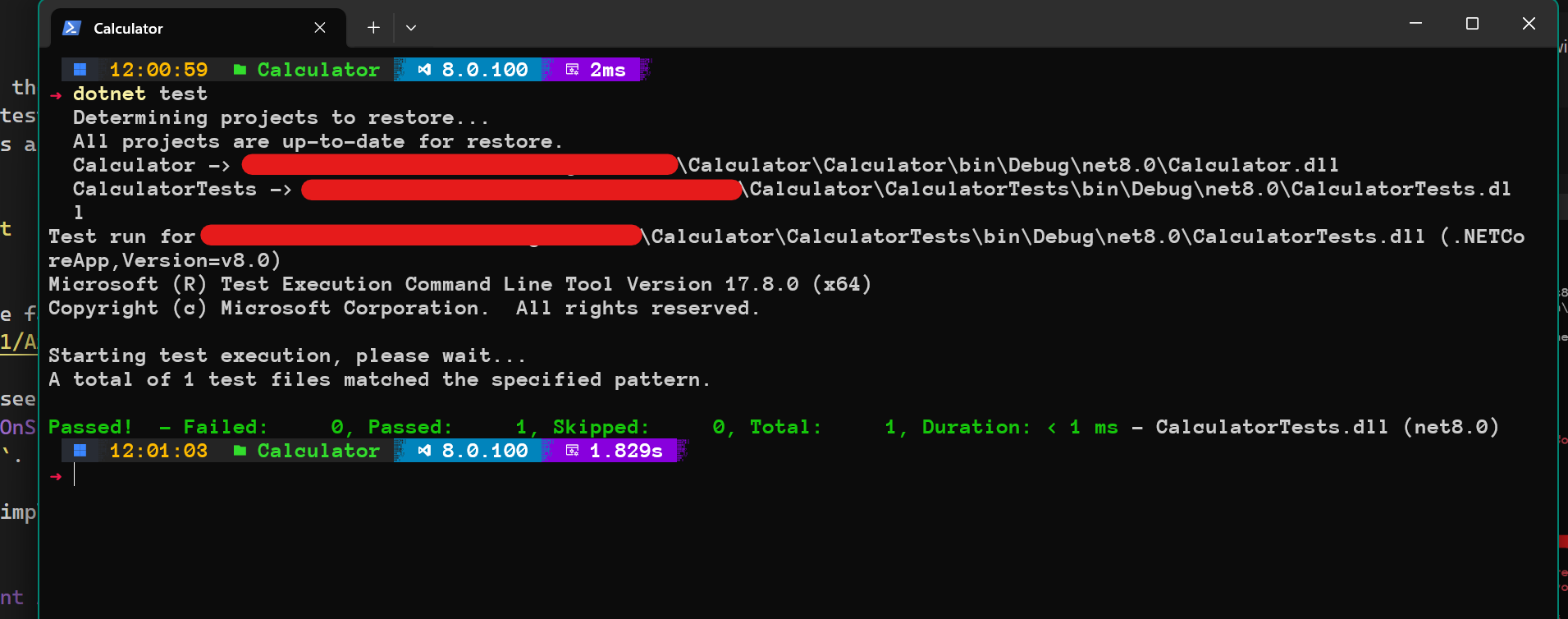
Great😁. Our unit test has passed successfully. You can now add Unit Testing into your resume hahaha 😂.
Lets dive little deep now and see what else we can do.
Lets write a test case for division and lets see how that turns out to be.
[Fact]
public void Division_OnSuccess_ReturnsCorrectResult()
{
    // Arrange
    Calculator _sut = new Calculator();
    int num1 = 30;
    int num2 = 5;
    int expected = 6;

    // Act
    int result = _sut.Division(num1, num2);

    // Assert
    Assert.Equal(expected, result);

}
Lets write the division function.
public int Division(int num1, int num2)
{
  return 0;
}
When running dotnet test command we will now see that one of our test is passing(AdditionTest) and another is failing(DivitionTest).
Now, lets make the test pass:
public int Division(int num1, int num2)
{
  return num1 / num2;
}
Testing Exceptions❗
As we can see both the tests has passed. But what if we pass 0 as the dividend to the function what will happen, lit will throw the divided by zero exception. So we will need to test that as well.
[Fact]
public void Division_OnZeroAsDividend_ThrowsDivideByZeroException()
{
    // Arrange
    Calculator _sut = new Calculator();
    int num1 = 3;
    int num2 = 0;

    // Act and Assert
    Assert.Throws<DivideByZeroException>(() => _sut.Division(num1, num2));
}
In this one as you can see the act and assert are together. The Throws<> function will check if the functions that is passed as parameter which is a lambda function throws DivideByZeroException or not and to pass the test it should throw the exception. Run the test again and there you will see 3 tests passed.
Parameterized Test cases 🤯
Well, lets see what if we want to pass parameters to a test function so that we would not have to write a lots of test cases for different data. Lets consider the first test again.
[Fact]
public void Addition_OnSuccess_ReturnsCorrectResult()
{
    // Arrange
    Calculator _sut = new Calculator();
    int num1 = 10;
    int num2 = 20;
    int expected = 30;

    // Act
    int result = _sut.Addition(num1, num2);

    // Assert
    Assert.Equal(expected, result);
}
In this test case we pass only 10 and 20. But what if we want to test many data sets, like 20 and 30, 40 and 45, 10 and 5 just like we see in these coding websites like leetcode, hackerrank or any other. Well Thanks to [Theory] that we don’t have to write 100 test cases for 100 different data sets. We can use Theory and InlineData attributes to pass data to the function. See the below code and you will understand.
[Theory]
[InlineData(20, 30, 50)]
[InlineData(40, 45, 85)]
[InlineData(10, 5, 15)]
public void Addition_OnSuccess_ReturnsCorrectResult(int num1, int num2, int expected)
{
    // Arrange
    Calculator _sut = new Calculator();

    // Act
    int result = _sut.Addition(num1, num2);

    // Assert
    Assert.Equal(expected, result);
}
First thing to remember about above code is that it is not just 1 test case now they are 3 test cases and each test case has its own values for num1, num2 and expected. One you run the dotnet test command it will show 5 tests passed.
In the above test case [Theory] is an attribute which just like [Fact] treats the function as a test function except for the difference that it will ask for parameters. And now we have passed 3 parameters. [InlineData] is simply to pass data to the test function. InlineData will pass the 3 values that are passed to it to the function Addition_OnSuccess_ReturnsCorrectResult. These are now like 3 test cases they will now be treated as below each with a different test inputs and expected results:
public void Addition_OnSuccess_ReturnsCorrectResult(20, 30, 50)
{
}

public void Addition_OnSuccess_ReturnsCorrectResult(40, 45, 85)
{
}

public void Addition_OnSuccess_ReturnsCorrectResult(10, 5, 15)
{
}
What should I test 🤔
This is actually the most discussed thing about testing. There are two things either test everything or test nothing which are both bogus as one will waste a lots of time and other will just leave a lots of bugs and issues in the software. So here is an advice which says test what is important. One will say how do I know what is important, so lets break it down a little.
What❓
In an ecommerce application lets say there is an API for getting CART items which are in the database but the API fails and doesn’t get the values for the cart. Now the user is in the delimma whether he should continue shopping or not he will most probably leave the website and visit other site. So the CART API is very important that can lead a huge loss if it went down and didn’t worked well. Another example is register user if a user is not able to register then he won’t buy anything. When a user clicks on checkout the API fetches the items that he wants to buy and their price and then calculates the total so he can pay but what if that API fails that will lead to a huge problem. What if an email component fails and it doesn’t send email sometimes but sometimes it does that will cause a loss so what are you thinking just write the fricking test for it.
What not❗
Lets say we have a small function that concats two functions it just returns string1+string2 do we need to test it probably now.
public string ConcatenateStrings(string first, string second)
{
    return first + second;
}
If we have an about page on UI which is just the description of the company then if we have an API that fetches those details from database and if sometimes that API fails what will happen a visitor will probably not be able to visit that page but who does visit that page maybe 1 person a in a month will want to visit the about page so writing test cases for the API that just returns about details that is not necessary or maybe that is over engineering. Another example is lets say there is an API that fetches customer reviews which are sometimes important but won’t cause any loss so maybe that API doesn’t need to be test.
After all, remember it also depends on the organization that you are working with how they write and maintain testing. Some organization doesn’t even write test cases.
Conclusion
In the realm of software development, unit testing is not just a good practice; it’s a necessity. The benefits of early bug detection, code quality assurance, and enhanced collaboration make unit testing an indispensable part of the software development process. By investing time and effort into creating comprehensive and well-maintained unit tests, developers can build robust, scalable, and maintainable software that meets both user and business expectations. As the saying goes, “Test early, test often,” and this rings especially true in the dynamic and ever-evolving landscape of C# and .NET development.
Well, I guess that is it, and I hope I didn’t bored you to death. Comment down if it was helpful.